Hot Wallet vs Cold Wallet: What Each Is and Which to Use
A hot wallet is a crypto wallet whose keys sit on an internet-connected device, such as a phone app. A cold wallet keeps the keys offline, usually on a hardware device. Cold storage is safer against online attacks but less convenient; hot wallets are handy for small, frequent use.
Both wallet types do the same job: they hold the private keys that let you spend your crypto. The difference is where those keys live, and that decides how they can be attacked.
Hot vs cold wallet at a glance
| Hot wallet | Cold wallet | |
|---|---|---|
| Keys stored | On an internet-connected device | Offline, often on a hardware device |
| Examples | Phone app, browser extension, desktop app | Hardware wallet, paper or metal backup |
| Main risk | Malware, phishing, fake apps | Losing the device or backup; scams at signing time |
| Convenience | High: sign anywhere in seconds | Lower: you need the device |
| Cost | Usually free | Device price |
| Best for | Small balances and regular use | Larger balances held long term |
What is a hot wallet?
A hot wallet is any wallet with keys on a device that goes online. Phone apps and browser extensions are hot wallets. They connect to apps and exchanges easily, which makes them useful, and also exposes them: a malicious app, a fake website or malware can steal keys or trick you into approving a bad transaction.
What is a cold wallet, and what is cold storage?
Cold storage means keeping keys somewhere that is not connected to the internet. A hardware wallet is the common form: a small device that stores keys and signs transactions internally, so the keys never touch your computer or phone. Some people also keep a paper or metal backup of their seed phrase in a safe, which stores the backup cold, not a working wallet.
Some devices connect by Bluetooth or NFC to a phone to send signing requests. The keys still stay on the device, which is why such hardware wallets are still described as cold.
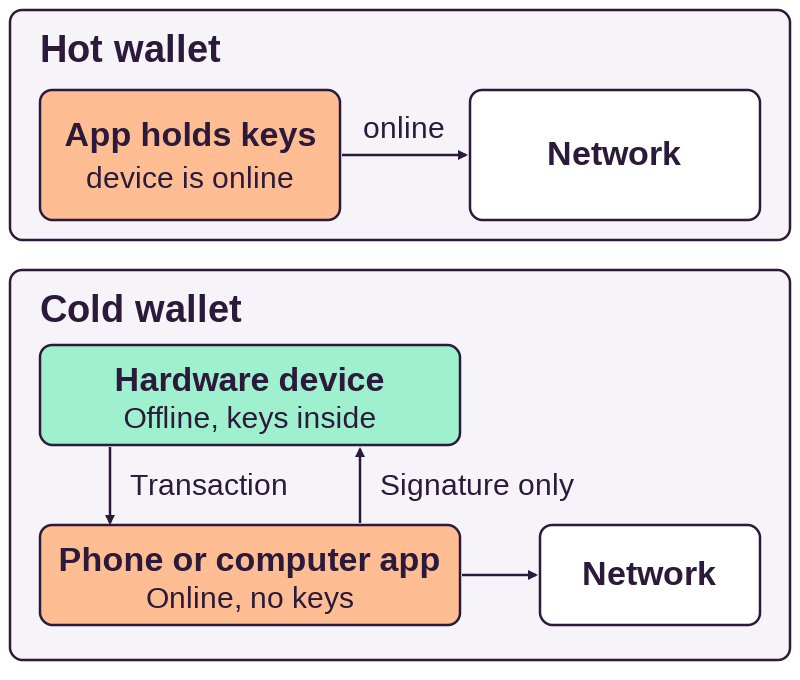
Where the keys live, and what touches the internet.
How cold storage works
- The device creates your keys inside a secure chip.
- Your app builds a transaction and sends it to the device.
- You check the details and approve on the device.
- The device signs and returns only the signature.
- The app broadcasts the signed transaction to the network.
Risks of each
- Hot wallets: phishing, malware and fake apps. Never type a recovery phrase into a website.
- Cold wallets: losing the backup (no one can restore it), buying a tampered device, or signing a scam transaction. A hardware wallet can’t tell a good approval from a bad one.
- Both: if someone gets your recovery phrase, they control the coins.
Examples from wallet makers
Product features differ, and the site has tested none of these. Ledger’s Nano Gen5, Flex and Stax connect over USB-C, Bluetooth and NFC, with a secure element rated CC EAL6+; the Nano X is rated CC EAL5+ and also uses Bluetooth. Trezor’s Safe 7 offers Bluetooth that can be turned off. SafePal’s S1 is described by SafePal as “100% air-gapped”: it has no NFC, WiFi, Bluetooth or USB and signs via QR codes. Tangem’s ring connects to a phone over NFC and needs no cable or battery. The upshot: “cold” covers a range, from fully air-gapped to wireless devices whose keys never leave the chip.
What a signing request looks like
When you approve a transaction on a hardware wallet, the device screen shows the receiving address and amount. Check both there, not on your computer. A malicious site or malware can change what the computer displays but cannot change what the device screen shows. That check is the whole security benefit, so skipping it removes most of the value.
Worked example: splitting savings
An illustration, not advice. Someone holds the equivalent of 2,000 units of currency in crypto and spends about 10 percent of it each month on payments and trades. They keep 300 in a phone wallet for that activity, and 1,700 on a hardware wallet. Once a quarter they top up the phone wallet from the hardware wallet. If the phone is compromised, the loss is capped at 300. The split is a personal decision about how much you can lose.
Which should you use?
Many people use both: a hot wallet for small amounts they spend, and a cold wallet for savings. There is no fixed split; think about how much you could lose without trouble. To pick a device, read the best hardware wallets or the Ledger wallet review. Once you have one, our guide on moving crypto to cold storage covers the steps, and the best crypto wallets page covers apps.
For wallets that suit someone new to this, see the best crypto wallets for beginners.
What we have not confirmed
Device specifications and prices change; check the maker’s own site. The site has not tested any wallet named here.
Common questions
Is an exchange account a hot wallet?
Not exactly. On an exchange the company holds the keys, so you rely on it. Our crypto wallet explainer covers the difference. For how one custodial platform’s terms describe custody, see is Uphold safe.
Can a cold wallet be hacked?
It is much harder to attack online, but you can still lose funds through a stolen backup, a tampered device or a bad approval.
Is a phone wallet with Face ID a cold wallet?
No. Biometrics unlock the app on a device that is online, so the keys are still on a connected device. A hot wallet is defined by where the keys live, not by how it unlocks.
Is a Bluetooth hardware wallet still cold?
The makers say yes, because the keys stay inside the device and only signatures leave. Some buyers prefer devices with no radios at all, such as air-gapped QR designs. Which risk matters more is your call.
Do I lose access if my hardware wallet breaks?
No, if you have the recovery phrase. Any compatible wallet can restore it. See how to recover a crypto wallet.
Sources
- bitcoin.org supports: Wallet security guidance, including keeping keys offline
- github.com supports: Recovery phrase standard used to back up both types