What Is a Seed Phrase? How It Works and How to Keep It Safe
A seed phrase, also called a recovery phrase, is a list of 12 or 24 words that backs up a self-custody crypto wallet. The words encode the secret from which every private key in the wallet is made, so anyone who has them can take your funds, and if you lose both the phrase and the wallet, nobody can restore them.
If you hold crypto in your own wallet, the seed phrase is the most important thing you own. It is the master backup: whoever has the words controls the funds, on any device, anywhere in the world.
Seed phrase key facts
| Other names | Recovery phrase, secret recovery phrase, mnemonic phrase, backup phrase |
| Length | Usually 12 or 24 words. The standard also allows 15, 18 and 21. |
| Where the words come from | A fixed list of 2,048 words (the BIP-39 standard). English is the most common list. |
| What it controls | Every private key and address in the wallet, across all the coins it holds |
| Who has one | Self-custody wallets: hardware wallets and wallet apps. Exchange accounts don’t give you one. |
How a seed phrase works
- The wallet creates a random number. When you set up a new wallet, it generates 128 bits of randomness for a 12-word phrase, or 256 bits for 24 words.
- The number is turned into words. The randomness is split into 11-bit chunks, and each chunk picks one word from the 2,048-word list. The last word includes a checksum, so a random set of words usually isn’t a valid phrase, which catches most typing mistakes.
- The words become the wallet’s master seed. The wallet runs the phrase through a one-way function to get a master seed.
- The seed produces all your keys. From that one seed, the wallet derives a private key and address for each account and each blockchain it supports. This is why one phrase restores everything, and why you only need to back it up once.
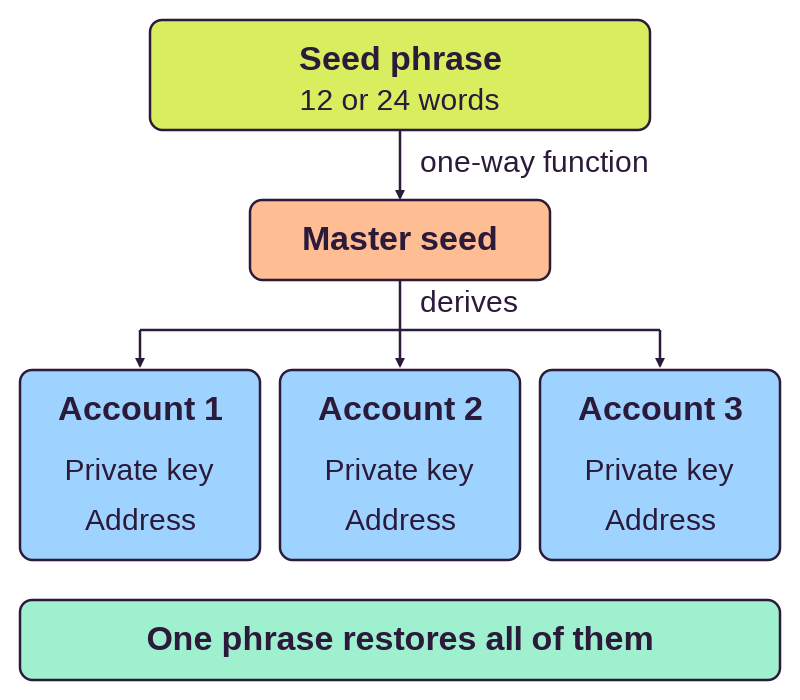
How one seed phrase leads to many accounts.
Because the process is an open standard, you can usually restore a phrase in another wallet that supports it. If your balances don’t appear after restoring, the new wallet may use a different derivation path, the setting that decides which addresses it checks. Try its advanced restore options before assuming the funds are lost.
What a seed phrase looks like
It is a numbered list of ordinary, lowercase English words, such as “ocean”, “ticket” or “rapid”, with no numbers, names or punctuation. The order matters: the same words in a different order make a different wallet, or no valid wallet at all. In the English list, the first four letters of every word are unique, which is useful if you stamp your backup onto metal.
Is a 12-word or 24-word phrase safer?
Both are far beyond guessing. A 12-word phrase has 2^128 possible combinations, more than any computer could search. A 24-word phrase (2^256) adds an extra margin, at the cost of more words to store. How you store the phrase matters far more than its length.
Seed phrase vs private key vs password
| Seed phrase | Private key | Password or PIN | |
|---|---|---|---|
| What it is | Master backup for the whole wallet | The secret for one address | Unlocks the app or device |
| Restores funds on a new device | Yes, everything | Only that one address | No |
| If someone steals it | All funds at risk | That address’s funds at risk | They also need your device |
| Can you change it? | No. To get a new one, make a new wallet and move your funds. | No | Yes |
For more on keys and addresses, see what a crypto key is.
The optional passphrase (the “25th word”)
The same standard lets you add a passphrase of your choice to the seed phrase. Each passphrase opens a separate wallet, so someone who finds your written words but not the passphrase reaches a different, empty wallet. The trade-off is serious: forget the passphrase and the funds behind it can’t be recovered, even with the correct words. Use one only if you can back it up as carefully as the phrase itself, and store it separately.
How to store a seed phrase safely
Do:
- Write the words by hand, in order, on paper or the card that came with your wallet. Check every spelling against the screen.
- Keep the backup somewhere private and safe from fire and water. A metal backup plate survives both.
- Consider a second copy in a separate secure location.
- Use the wallet’s backup check, if it has one.
Don’t:
- Photograph it, screenshot it, or save it in notes, email, chat or cloud storage. Anything connected to the internet can be hacked.
- Type it into any website, form or app, except when restoring a wallet you trust on the device itself.
- Share it with anyone: not support staff, not “wallet validation” services, not a friend helping you set up.
- Cut the phrase in half yourself to store in two places; each half gives away part of the secret. If you want shared backups, use a wallet that supports multi-share backups (Shamir backup, SLIP-39), where you need, for example, any 2 of 3 shares to restore.
A hardware wallet creates the phrase offline, so it never touches an internet-connected device; our Ledger wallet review shows how one maker handles setup and backups. To weigh up the options, compare hot vs cold wallets or see our picks for the best hardware wallet.
Seed phrase scams to watch for
Most thefts start with a trick to make you reveal the phrase:
- Fake support. Someone on social media, chat or the phone asks for your phrase “to fix” or “verify” your wallet. Genuine support never needs it.
- Phishing sites and fake apps. Copies of real wallet sites, extensions or apps ask you to “restore” or “sync” your wallet. Download wallet software only from the maker’s official site or your official app store.
- Pre-filled recovery cards. A hardware wallet that arrives with a phrase already written down has been tampered with. A genuine device creates the phrase during setup.
- Airdrop and reward claims. A site promises free tokens if you “import” your wallet with your phrase.
- Recovery services. After a loss, people offer to recover funds for a fee or for your phrase. Treat these offers as scams.
If you have been targeted, see how to report crypto scams.
What to do if your seed phrase is lost or exposed
- Lost, but you still have the wallet: create a new wallet with a new seed phrase, back it up properly, and move your funds to it straight away.
- Exposed, or you think someone has seen it: move your funds to a new wallet with a new phrase now. Changing your PIN or password does not help, because the phrase works without them.
- Lost, along with the device: the funds can’t be recovered. No company, developer or service can reset a seed phrase.
Our guide on how to recover a crypto wallet walks through restoring a wallet when you do have the phrase.
Do exchange accounts have a seed phrase?
No. On an exchange, the exchange holds the keys for you (custody), and you get back into your account with your email, password, 2-step verification and identity checks. That is easier to recover if you forget your password, but you depend on the exchange to keep the funds safe and let you withdraw. Moving funds to a self-custody wallet gives you a seed phrase, along with the job of protecting it.
If you are choosing a wallet for the first time, see the best crypto wallets for beginners. For how Coinbase handles its wallet phrase, see Coinbase recovery phrase.
Sources
- github.com supports: Seed phrase standard: 2,048-word list, 12 to 24 words, checksum, optional passphrase
- github.com supports: How one seed produces many private keys and addresses